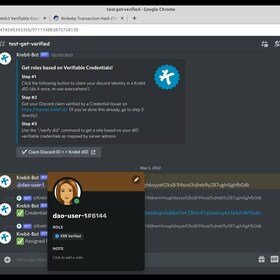
As promised, we’ve delivered the first of many integrations to enhance the Web3 experience using dID and Verifiable Credentials!
In order to test using the discord bot, here is the general process in TESTNET:
Step #1
Click the
this link to claim your discord identity in a Krebit dID (do it once, re-use everywhere!).
Step #2
Get your Discord claim verified by a Credential Issuer on
https://testnet.krebit.id/ (If you’ve done this already, go to step 3 directly)
Step #3
Use the “/verify did” command to get a role based on your dID verifiable credentials as mapped by server admins.